
If you have ever tried converting a YouTube transcript into a proper article, you know how tedious the manual approach can be. This guide covers the fastest, cleanest way to do it, and how AI has completely changed the game.
What is a YouTube transcript and why does it matter?
A YouTube transcript is an auto-generated or manually created text version of everything spoken in a video. YouTube creates these automatically using speech recognition, and they are available for most videos through the three-dot menu under any video player.
Transcripts matter for content creators for two main reasons. First, they give you a full written record of everything said in the video, perfect raw material for written content. Second, they form the foundation for repurposing video content into formats that can be indexed by search engines and read by audiences who prefer text.
The challenge is that a raw transcript is not an article. It is unstructured, unpunctuated, and reads more like a stream of consciousness than a polished piece of writing. Turning it into something publishable takes skill or the right AI tool.
The manual method (and why it fails at scale)
The traditional approach to converting a YouTube transcript into an article involves several manual steps: export the transcript, clean up the formatting, break it into paragraphs, identify key sections, write transitions, add an introduction, write a conclusion, and then edit for tone and clarity.
For a single video, this might take two to three hours. For a content creator publishing three or four videos per week, or an agency managing dozens of clients, the math quickly becomes impossible. You would need a full-time writer just to handle the transcript-to-article conversion pipeline.
This is exactly the problem that AI-powered tools like Gizmozo were built to solve.
How to convert a YouTube transcript into an article using Gizmozo
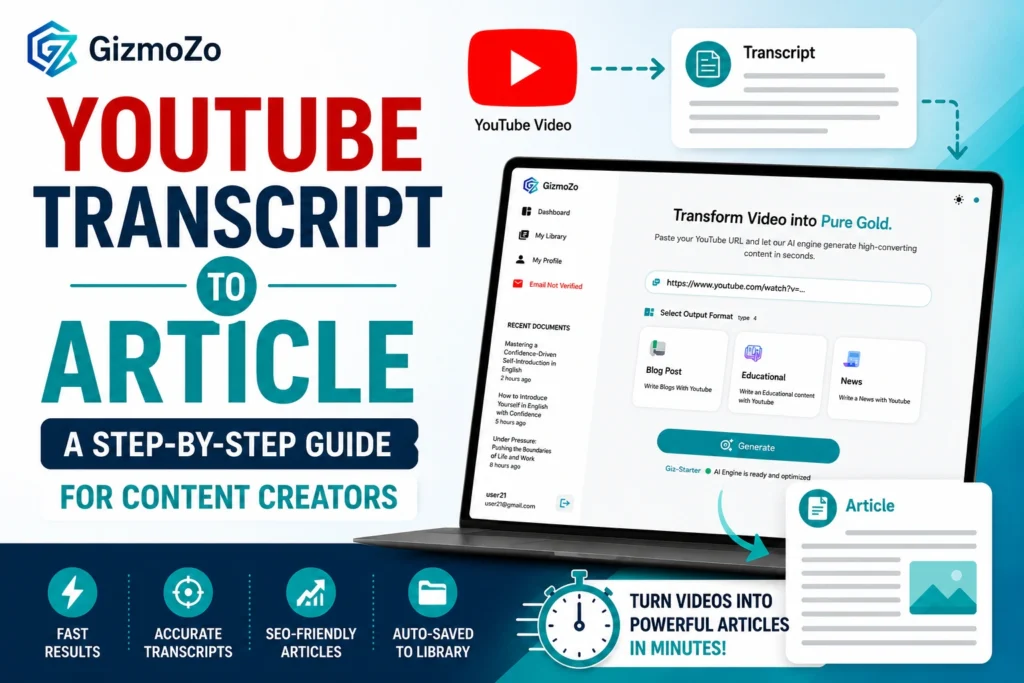
1. Copy the YouTube video URL
Navigate to the YouTube video you want to convert. Copy the full URL from your browser’s address bar. You do not need to manually export any transcript; Gizmozo handles that automatically.
2. Open Gizmozo and paste the URL
Head to Gizmozo.com and paste your YouTube URL into the main input field. The platform immediately begins processing the video, extracting the full transcript with high accuracy, and capturing every word spoken.
3. The AI processes the transcript
This is where the magic happens. Rather than simply formatting the raw transcript, Gizmozo’s AI reads the content, understands the key themes, and restructures everything into a logical article format with proper sections, flow, and readability.
4 Choose your article format
Select whether you want a standard blog post, an educational article, a news-style piece, or another format, depending on the content and your audience. Each format produces a differently structured output tailored to that style.
5 Review, copy, and publish
Your article is generated and saved automatically to your Gizmozo dashboard library. Copy it with one click, paste it into your CMS, and publish. The entire workflow takes under two minutes.
Best practice
For longer videos (over 30 minutes), the AI output tends to be especially strong because there is more source material to work with. Interviews, webinars, and long-form educational content produce particularly well-structured articles.
What makes a good transcript-to-article conversion?
Not all AI tools handle transcript conversion the same way. A strong conversion should do several things well: preserve the original meaning and intent of the video, restructure the information logically rather than just line-breaking the transcript, produce natural, readable prose, and generate content that is accurate to what was actually said.
Gizmozo achieves this by grounding the output in the actual transcript rather than generating from general AI knowledge. The content stays true to the original video; you are not getting hallucinated facts or invented details. You are getting the video’s content, transformed into readable text.
Who should be using this workflow?
YouTubers and video creators
If you are already creating video content and you have a library of valuable material that is invisible to search engines. Every video you publish is an article waiting to be written. Gizmozo makes that possible without extra work.
Bloggers and writers
YouTube is one of the most valuable research tools available. Convert expert interviews, conference talks, and educational content into referenced articles quickly, without hours of manual note-taking.
Marketing teams and agencies
Scale your content production without scaling your headcount. Process multiple videos per day and maintain a consistent publishing schedule across dozens of client websites.
Educators and course creators
Convert lecture recordings, tutorial videos, and training content into written study materials and reference guides that students can read and search.
Common questions about YouTube transcript to article conversion
Does it work on any YouTube video?
Gizmozo works on any YouTube video that has spoken content. This includes your own videos, public videos from other creators, and any video for which YouTube auto-generates a transcript. The output quality is directly tied to the clarity of the audio in the original video.
Is the output original content or copied?
The generated article is an AI-processed transformation of the transcript, not a copy. The wording, structure, and presentation are all newly generated based on the content. It is not duplicate content of the original video description or any existing text.
How long does the conversion take?
For most videos, the full transcript extraction and article generation take under 60 seconds. Longer videos (over an hour) may take slightly longer, but the process is still dramatically faster than any manual approach.