Clicks Communicator – A Phone That Reminds Me Why I Fell in Love with Physical Keyboards
Some devices instantly trigger a feeling you didn’t even realize you were missing. The Clicks Communicator did exactly that for me.
When I first saw it announced, I didn’t just see another Android phone. I saw a very deliberate idea—one that goes against the current trend of giant screens, endless scrolling, and phones that try to do absolutely everything. This device feels like it was built for people who actually want to use their phone less, but use it better.
I’ve spent years watching physical keyboard phones slowly disappear, and like many others, I tried to replace that experience with software tricks launchers, app timers, focus modes. None of those really worked for me long-term. The temptation to scroll always won. The Clicks Communicator feels like a rare attempt to solve that problem at the hardware level, and that alone makes it interesting.
Let me walk you through how this phone looks, feels, and what kind of person it actually makes sense for, based strictly on what’s been shared so far.
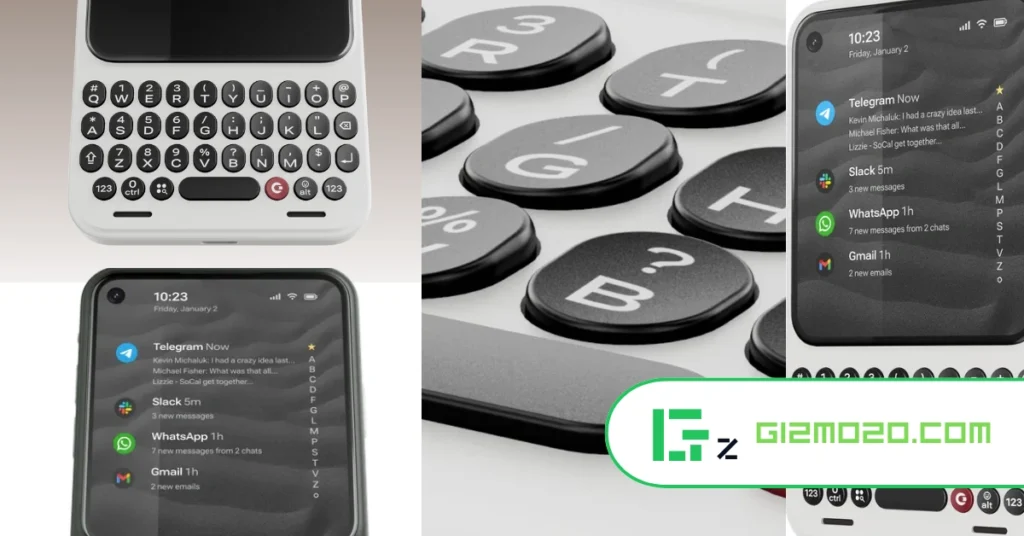
First Impressions – Familiar, But Not Stuck in the Past
The very first thing that hit me was the design. This phone doesn’t look like it’s trying to copy modern slab phones, and it’s definitely not chasing the foldable trend either. Instead, it immediately reminded me of classic keyboard phones, especially that BlackBerry-era form factor but updated just enough to feel relevant in 2026.
Visually, it almost feels like a modern take on a Palm-style device: compact, squared-off, and clearly built with purpose. The keyboard is front and center, and the screen sits above it in a way that feels intentional, not like an afterthought.
What I really like here is that the Clicks Communicator isn’t pretending to be a flagship killer. It’s not trying to replace your Pixel or Galaxy outright. From the beginning, it positions itself as a communication-first device, and that honesty goes a long way.
Design and Build Quality – Purpose Over Flash
The build feels very thoughtfully done. You get brushed aluminum side buttons, a solid overall frame, and a form factor that’s compact enough to be genuinely pocketable. At around 170 grams, it’s surprisingly light, especially compared to modern foldables or large phones.
One small detail I really appreciate is the LED notification ring around the power button. This isn’t just nostalgia; it’s practical. You can assign different colors to different apps or contacts, which means you can tell what kind of notification you’re getting without even turning the screen on. Face-up or face-down, it still works.
There’s also a physical kill switch on the side. Flip it, and the phone essentially leaves you alone. No lights, no distractions. For anyone trying to create boundaries with their phone usage, this is a genuinely meaningful feature.
Another nice touch is the interchangeable back covers. You can swap colors or textures, which makes the device feel a bit more personal instead of just another sealed slab of glass.
The Keyboard Experience – The Heart of the Device
This is where the Clicks Communicator really earns its name.
The physical keyboard is large enough to type comfortably, and more importantly, it’s deeply integrated into the software. This isn’t just keys slapped onto an Android phone. The keyboard is capacitive, meaning you can swipe across it to scroll instead of constantly reaching up to the screen.
That might sound small, but in daily use, it’s huge. It keeps your hands anchored, reduces awkward thumb stretching, and reinforces the idea that this phone is meant for doing things, not endless browsing.
You also get keyboard shortcuts. Hold the Clicks key and press another key to instantly launch apps or actions. Over time, this kind of muscle memory can seriously speed up how you use your phone.
The spacebar doubling as a fingerprint sensor is another smart decision. It feels natural and saves space without feeling gimmicky.
Display – Designed for Doing, Not Doom Scrolling
The screen is just over 4 inches and uses an AMOLED panel. That’s small by today’s standards, and that’s clearly the point.
This display isn’t built for binge-watching or endlessly scrolling social media. The shorter aspect ratio makes long scrolling sessions feel less satisfying, which subtly nudges you away from doom scrolling. You can scroll if you want to, especially using the keyboard swipe feature, but it’s not inviting you to stay there forever.
For messaging, emails, and quick interactions, the screen feels perfectly adequate. It complements the keyboard instead of trying to compete with it.
Performance and Hardware – More Than Enough for Real Life
Under the hood, the Clicks Communicator uses a MediaTek chipset built on a 4nm process. It’s clearly positioned as a mid-range processor, and honestly, that feels like the right choice here.
This phone isn’t trying to win benchmark wars. It’s designed to handle everyday tasks smoothly messaging, emails, productivity apps, light gaming, and general Android usage. From everything shared so far, it should be more than capable of doing exactly what it’s meant to do.
You also get 256GB of internal storage with microSD expansion up to 2TB. That’s something a lot of people have been asking for years, and it makes total sense on a device like this.
Battery Life – Small Screen, Big Advantage
The Clicks Communicator packs a 4,000mAh silicon-carbon battery, which is impressive considering the device’s size.
With such a small display and a communication-focused design, battery life should be one of this phone’s quiet strengths. It’s easy to imagine this lasting a long time between charges, especially if you’re not constantly streaming video or gaming.
Wireless charging support is also included, which adds convenience without complicating the design.
Software Experience – Android, But With a Clear Purpose
Software is where this phone really separates itself.
The Clicks Communicator runs Android 16, but it doesn’t feel like stock Android. It’s built around a customized version of Niagara Launcher, designed specifically for communication. Your home screen prioritizes messaging apps—SMS, email, WhatsApp, Slack, and similar tools right where you can reach them instantly.
Instead of a grid of apps begging for your attention, the interface keeps things focused. Yes, you still get access to the Play Store and regular Android apps, but the design constantly nudges you back toward purposeful use.
There’s also a dedicated side button that can trigger voice-to-text, start recordings, or transcribe meetings. Combined with the physical keyboard, this makes the device feel surprisingly capable as a productivity tool.
Security updates are promised for up to five years, which is reassuring for anyone considering this as a long-term device.
Camera – Functional, Not the Main Event
The phone includes a 50MP rear camera with optical image stabilization and a 24MP front-facing camera.
From everything shared, the expectation here feels realistic. This isn’t trying to replace a Pixel or a dedicated camera phone. The goal seems to be reliability something that’s good enough for everyday photos, documents, and video calls.
What gives me confidence is that the people behind this device clearly understand what a good smartphone camera experience should feel like, even if it’s not the primary selling point.
Strengths and Weaknesses
What Works Really Well
- Excellent physical keyboard integration
- Thoughtful software focused on communication
- LED notification system with real utility
- Compact, lightweight design
- Expandable storage and headphone jack
- Clear identity and purpose
Where It May Not Be for Everyone
- Small screen won’t suit media-heavy users
- Not designed to replace a flagship phone for everyone
- Companion-device concept may confuse some buyers
Who This Device Is Really For
The Clicks Communicator isn’t for everyone and that’s actually its biggest strength.
This phone is for:
- People who miss physical keyboards
- Users trying to reduce screen addiction
- Productivity-focused users
- BlackBerry fans looking for something modern
- Anyone who values communication over consumption
Whether you use it as your main phone or as a secondary companion device, it’s clearly designed for people who understand what they want from their phone.
Final Thoughts – A Rare Device with a Clear Soul
What excites me most about the Clicks Communicator isn’t just the keyboard. It’s the fact that this phone knows exactly what it is.
It doesn’t overreach, chase trends, and pretend to be something it’s not. Instead, it delivers a focused, thoughtful experience that feels increasingly rare in the smartphone world.
At around $500 and even less if you reserve early, it sits in a sweet spot for a niche device that actually offers something different. Whether you end up using it as a daily driver or a companion phone, it feels like a device built by people who genuinely understand their audience.
In a world full of phones that all feel the same, the Clicks Communicator stands out by doing less and doing it better.